
Building Speedy - Part 2: The Bot
In Building Speedy – Part 1,, we built the knowledge base - a GitHub-synced, vector-searchable mirror of the handbook. Now we wire it up to where the team actually works: Slack.
Building the Bot
Listening for messages
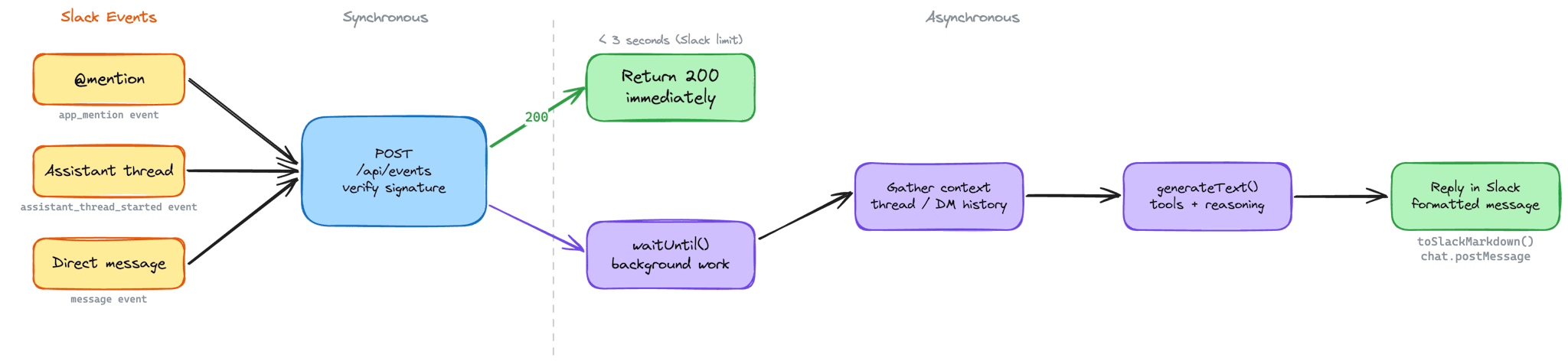
Speedy runs as a Next.js app on Vercel, with a single POST endpoint (`/api/events`) that receives all Slack events. When a message comes in, the first thing we do is verify it's genuinely from Slack - same HMAC-SHA256 pattern as the GitHub webhook, but using Slack's signing secret and a timestamp check that rejects anything older than five minutes to guard against replay attacks.
Once verified, we route the event based on its type. There are three ways someone can talk to Speedy:
- `app_mention` - someone @-mentions Speedy in a channel or thread
- `assistant_thread_started` - someone opens a conversation through Slack's Assistant interface
- `message` - a direct message lands in Speedy's DMs
Each path has slightly different UX. When someone @-mentions Speedy in a channel, we post an "is thinking..." message immediately, then update it in-place with the final response - so the channel stays clean. In assistant threads, we use Slack's native status API to show a typing indicator. DMs get a straightforward reply.
Responding asynchronously
Slack gives you three seconds to respond to an event before it times out and retries. Three seconds isn't enough to run a vector search, call an LLM, and format a response. So we lean on Vercel's `waitUntil()` - return a 200 to Slack immediately to acknowledge the event, then process the message asynchronously in the background. Slack is happy, and Speedy gets as long as it needs.
Why Vercel?
Vercel isn't just where Speedy runs - it's why deploying changes feels effortless. Push to `main`, and the build starts automatically. Next.js builds are fast, the deployment pipeline is zero-config, and a new version of Speedy is live in production in around 22 seconds. That's push-to-live in less time than it takes to make a coffee. The tight feedback loop matters when you're iterating on prompts, tweaking tools, or debugging a response that didn't land right - you want to ship a fix and see the result immediately, not wait for a CI pipeline to churn through.
The serverless model also simplifies the architecture. There's no server to manage, no scaling to configure, no idle compute burning money between messages. Each Slack event spins up a function, does its work, and disappears. For a bot that might handle ten messages an hour or a hundred, that elasticity is exactly right. And `waitUntil()` - a Vercel-specific primitive - is what makes the async pattern possible without reaching for a job queue or a background worker. It's the kind of platform feature that saves an entire layer of infrastructure.
Making it feel instant
People don't wait for things on the web anymore. Interfaces react instantly - buttons highlight on tap, pages transition mid-click, content streams in as it loads. That expectation carries over to Slack. When someone asks Speedy a question, silence feels like it's broken. Even a few seconds of nothing triggers the thought: did it work?
There's one exception: simple greetings. Both the `app_mention` and `message` paths check `isSimpleGreeting` before doing anything else. If the message matches - a "hi", "hello", "hey", or similar - Speedy respondsli immediately with a fixed `PROMPTS.GREETING` string and skips the agent pipeline entirely. No thinking indicator, no tool calls, no LLM round-trip. The response is instant enough that a status message would disappear before anyone noticed it.
For everything else, Speedy never leaves the user staring at a blank thread. The moment a message arrives, before any real work starts, the user sees feedback. How that feedback appears depends on the context:
- In channels and threads (via @-mentions), Speedy posts an "is thinking..." message immediately using `chat.postMessage`. That message holds the space - the user can see Speedy received the question and is working on it. Once the response is ready, we call `chat.update` on the same message timestamp, swapping "is thinking..." for the actual answer. The message morphs in-place. No second message cluttering the thread, no delete-and-repost - just a clean transition from status to response.
- In assistant threads, the mechanism is different but the principle is the same. Slack's Assistant API provides `assistant.threads.setStatus`, which displays a native typing-style indicator - the same kind of subtle animation you see when a colleague is typing. We set it to "is thinking..." when work begins and clear it with an empty string once the response is posted as a new message in the thread.
The key insight is that perceived performance matters as much as actual performance. Speedy's response time is dictated by the LLM - typically a few seconds, sometimes longer for multi-step tool calls. We can't make the model faster, but we can make the wait feel intentional rather than broken. A status indicator turns dead air into a visible process, and that's the difference between a user who trusts the bot and one who sends the same question twice.
Gathering conversation context
Before we call the AI, we need to figure out what the user is actually asking - and whether there's prior conversation to factor in. If the message came from a thread, we pull the full thread history with `conversations.replies`. If it's a DM, we grab the last 20 messages with `conversations.history` and reverse them into oldest-first order, which is what the AI SDK expects. We also look up the user's real name from their Slack profile, so Speedy can address them personally.
Calling the model
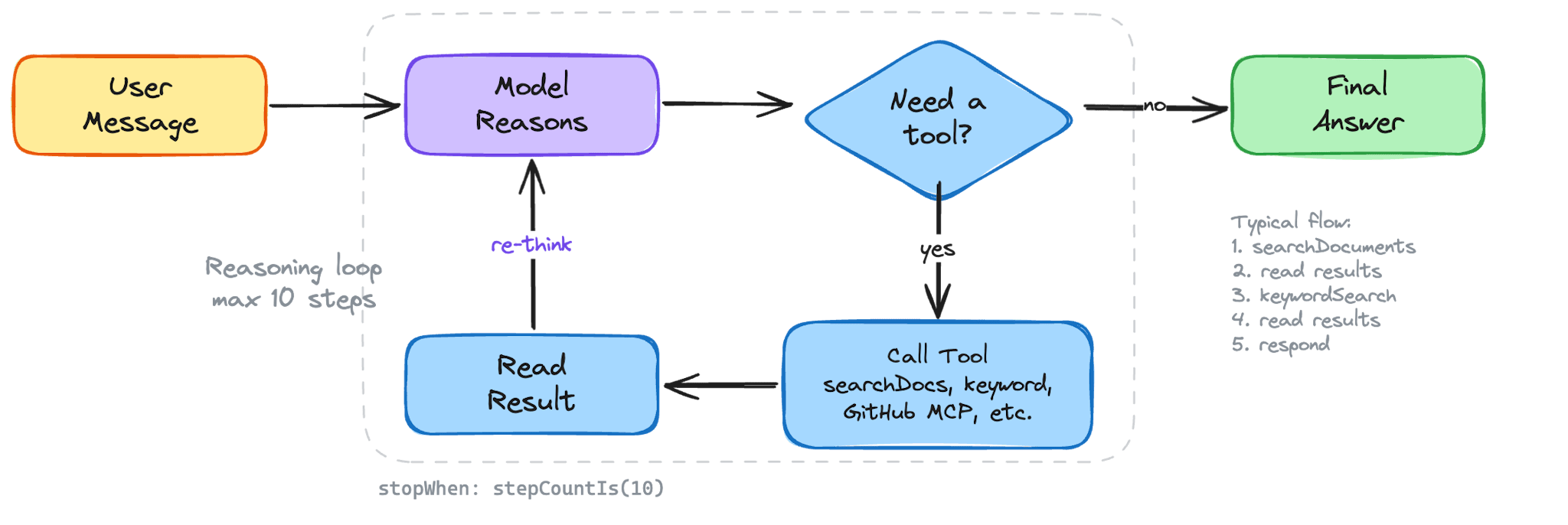
Everything converges on a single `generateResponse` function. It stitches together the system prompt, the conversation history, and the full set of tools - local and external alike - then hands it all to the Vercel AI SDK's `generateText`:
const { text, steps, usage } = await generateText({
    model: AI_CONFIG.chatModel,
    system,
    messages,
    tools: allTools,
    stopWhen: stepCountIs(AI_CONFIG.maxSteps),
});`stopWhen: stepCountIs(AI_CONFIG.maxSteps)` caps the reasoning loop at ten steps - meaning the model can call tools and reason through results up to ten times before it has to produce a final answer. In practice, most questions resolve in two or three steps - a search, maybe a follow-up search with a different tool, then the response.
Provider flexibility
The chat model isn't hardcoded. `AI_CONFIG.chatModel` reads a `CHAT_PROVIDER` environment variable and returns the right provider - Anthropic's Claude, Google's Gemini, or OpenAI's GPT. Switch the env var, and Speedy switches models without touching a line of business logic. Embeddings stay on OpenAI's `text-embedding-3-small` regardless, since our vector store is calibrated for its 1,536-dimensional output.
This isn't just nice-to-have engineering. It's a practical safeguard - if one provider has an outage or a pricing change, we can pivot in seconds. It also lets us benchmark different models against the same prompts and tools to see which one best fits the persona we're building.
Formatting for Slack
LLMs think in Markdown. Slack doesn't render Markdown. So before anything reaches the user, we run the response through `toSlackMarkdown` - a lightweight formatter that converts `### headers` to **bold text**, swaps `**bold**` for Slack's `*bold*`, transforms `[links](url)` into Slack's `<url|text>` format, and converts `~~strikethrough~~` to `~strikethrough~`.
For longer responses, we split the text into multiple Slack section blocks, each under 3,000 characters, breaking at newline boundaries so nothing gets cut mid-sentence.
Why Speedy?
Digital Speed. It's in the name. So when it came to naming the bot, we didn't agonise over it - we called it Speedy.
It's direct. It fits. And if you're going to build something that saves people time, it probably shouldn't have a name that requires an explanation.
The cheetah followed the same logic. The fastest land animal on earth - built for exactly one thing, and exceptional at it. When we needed an identity for Speedy, a cheetah wasn't a stretch. It was the obvious answer.
Yes, we gave a pipeline of collapsing neural networks a name and a face. We gave it a persona, a voice, a personality. It's not human. It's not an animal. It's something new - and we're not going to pretend otherwise by borrowing a word that doesn't quite fit. Not because AI needs a mascot to function, but because the difference between a tool people tolerate and a tool people actually use is whether it feels like something worth talking to. Names matter. Faces matter. The way something sounds when it replies to you matters.
Speedy was never going to be "AI Assistant v1.0." That's a tool. We wanted a teammate. We chose a cheetah as the icon. Deal with it.
Giving Speedy a Voice
An LLM with access to the right data still isn't useful if it sounds like a corporate FAQ bot. We wanted Speedy to feel like a colleague - someone who knows the handbook inside out and talks like a human being. That meant investing in the system prompt.
The system prompt structure
Every conversation Speedy has starts with the same foundation. We build the system prompt by concatenating three pieces:
const system = [PROMPTS.PERSONAS.SPEEDY, "### METADATA", metaData].join('\n\n');The persona defines who Speedy is. The metadata gives Speedy situational awareness - the current date and time, and the name of the person asking.
Persona design
Speedy's persona prompt is detailed and opinionated. It opens with a role definition - "You are a knowledgeable DigitalSpeed Team Member" - and sets clear expectations: always search before answering, never guess, and stay within the Company-as-Code documentation.
But the real personality comes from the tone instructions. We tell Speedy to use the person's first name naturally ("Hey Sarah, the docs mention..."), to write in plain English without AI-speak, and to keep things conversational - like sending a quick helpful message to a teammate, not generating a report. We explicitly ban markdown tables (Slack doesn't render them), @-mentions (nobody wants an accidental ping), and the kind of hollow filler that makes chatbots feel robotic.
Metadata injection
The metadata block gives Speedy context that a static prompt can't. We format the current date and time in `en-GB` locale so Speedy can reason about things like "who's off next week?" without getting tripped up by relative dates. We also inject the user's full name from their Slack profile, which is how Speedy knows to say "Hey Alex" rather than "Hello, user".
Anti-hallucination guardrails
This is the part that matters most. Speedy's prompt includes a strict grounding rule: only use information returned by tools. If the tools return nothing, Speedy doesn't know the answer - full stop. We explicitly tell it not to reach into its training data to guess common tools, software, or email addresses. If someone asks about something that isn't in the handbook, Speedy declines warmly and suggests pinging a lead or adding it to the docs.
The prompt also enforces a "search first" discipline. Even if a question seems off-topic, Speedy must search the documentation before declining - because plenty of questions about specific tools or processes look generic but are actually covered in the Company-as-Code repo.
Giving Speedy a Face
A bot with personality deserves a face to match. We didn't want a generic avatar or a stock icon - we wanted something that felt unmistakably Speedy, grounded in DigitalSpeed's visual identity.
AI-assisted brand alignment
We started by installing our brand persona as an AI skill using `npx skills add digitalspeed/ai-skills`. This gave us a structured reference for DigitalSpeed's visual identity - our colour palette, graphic language, and the principles behind them. Instead of briefing a designer from memory, we used this persona to craft an image generation prompt that baked in the brand from the start.

The prompt itself is detailed and opinionated - much like Speedy's system prompt. It describes a cheetah face built entirely from high-contrast black and white volcanic lava photography, with the brand's scarlet red (`#FF402D`) reserved for the eyes and azure blue (`#DDF0F6`) for the cheek spots. The texture isn't decorative - it is the icon. Black cooled rock forms the face, white molten flows trace the contours, and the two accent colours are the only things that break the monochrome. The result is something that reads instantly at Slack avatar size: bold, textural, and unmistakably on-brand.
Iterating with Nano Banana
We generated the image using Google's Nano Banana model. Image generation is rarely one-shot - the first outputs captured the right idea but not the right execution. Some versions were too illustrative, others lost the lava texture at small sizes, a few got the colour balance wrong. So we iterated: adjusting the prompt, regenerating, reviewing, and repeating until the output matched what we had in our heads. Classic human-in-the-loop - the AI generates, but a person decides when it's done.
The final icon sits in Speedy's Slack profile and at the top of every conversation. It's a small detail, but it's the kind of thing that makes a bot feel like a teammate rather than a tool.
The First Conversation
Voice, face, and icon only get you so far. The moment that actually shapes someone's perception of Speedy is the first time they open a thread. If that first screen feels generic or unhelpful, people won't come back. So we put real thought into the greeting and the suggested prompts - the two things every user sees before they've typed a word.
The greeting
When someone opens an assistant thread, Speedy immediately posts an introduction:
"Hey! I'm Speedy, your DigitalSpeed teammate. I can help you navigate our Company-as-Code handbook - policies, procedures, onboarding steps, you name it. I can also check who's on holiday, look up GitHub repos, PRs, and issues across the org, and dig up links or docs you need. Just drop a question here and I'll track it down for you."
It's short, but it does three things deliberately. First, it establishes the persona - teammate, not assistant. Second, it sets scope - handbook, holidays, GitHub - so people know what to ask about without having to guess. Third, the closing line ("Just drop a question") lowers the bar. It's a DM to a colleague, not a search query.
Suggested prompts
Right below the greeting, Slack's Assistant API lets us surface clickable prompt buttons - pre-written questions that users can fire off with a single tap. We set these via `assistant.threads.setSuggestedPrompts` and they show up as the default options in every new thread:
New starter setup: "I just joined - what tools do I need to install and where do I find the setup guide?"
Open PRs: "Are there any open pull requests across the org right now?"
Who's off next week:"Who's on holiday next week?"
These aren't random. Each one is chosen to showcase a different capability - handbook search, GitHub integration, and live holiday data - while also being genuinely useful questions that someone would actually ask. The "New starter setup" prompt is especially important: new joiners are Speedy's highest-value audience, and making their first question a one-tap experience means they get an immediate win before they've even figured out where the docs live.
Most users will click one of these before they ever type a free-form question, so they double as a demo. If the first answer is fast, relevant, and sounds like a human wrote it, the trust is established. If it's slow, vague, or robotic, no amount of underlying capability will recover that impression.
What we'd measure
Ideally, we'd have telemetry on these prompts - which ones get clicked, how often they lead to follow-up questions, whether users who start with a suggested prompt come back more often than those who don't. That data would let us tune the prompts over time: rotate in seasonal ones ("What are the office hours over Christmas?"), add prompts for new integrations as they ship, or retire ones that nobody clicks. We haven't instrumented this yet, but it's a natural extension of the structured logging we already have in place.
Speedy's Toolkit
Speedy doesn't generate answers from thin air. Every response is grounded in tool results - data fetched from the knowledge base or external APIs. The Vercel AI SDK's tool system makes this work cleanly: each tool is a typed function with a Zod schema for its parameters and a description that tells the model when to use it. The model decides which tools to call, calls them, reads the results, and continues reasoning - up to ten steps per conversation turn.
Some tools are defined locally - semantic search, keyword search, holiday lookups. But others come from external services via the Model Context Protocol (MCP), an open standard for connecting AI models to external tool providers over a client–server architecture.
GitHub as a live tool
Speedy originally only knew what was in the handbook. It didn't know what was happening in the codebase - open PRs, recent merges, review status. Adding GitHub as a live tool changed that, and MCP made it straightforward.
GitHub hosts an MCP server at `api.githubcopilot.com/mcp/` that exposes its API surface - pull requests, issues, repos, branches - as callable tools. Instead of hand-writing a GitHub tool with bespoke API calls, we connect to this server using the AI SDK's MCP client over Streamable HTTP transport:
dfdimport { createMCPClient } from '@ai-sdk/mcp';

const client = await createMCPClient({
  transport: {
    type: 'http',
    url: 'https://api.githubcopilot.com/mcp/',
    headers: {
      Authorization: `Bearer ${process.env.GITHUB_TOKEN}`,
    },
  },
});
The client connects, discovers the available tools, and returns them as Vercel AI SDK–compatible tool definitions. We merge these with our local tools before handing everything to the model:
const mcpTools = mcpClient ? await mcpClient.tools() : {};
const allTools = { ...tools, ...mcpTools };
The model doesn't know or care which tools are local and which come from MCP - they all look the same. It can now answer questions like "are there any open PRs on Cantor?", "what did we ship last week?", or "has anyone reviewed my PR?" by calling GitHub tools alongside handbook searches in the same reasoning loop.
There's one caveat worth noting for serverless environments like Vercel: the MCP client connection must be opened before the request and closed after. Each invocation spins up a fresh HTTP connection to the MCP server and tears it down when done. This adds a small amount of latency per request, but it's the cleanest way to manage the connection lifecycle in a stateless function.
Semantic search
`searchDocuments` is Speedy's primary tool for conceptual questions - "how does onboarding work?", "what's our deployment process?". It takes the model's search query, embeds it using the same `text-embedding-3-small` model we used to index the handbook, and runs a cosine similarity search against pgvector:
SELECT content, file_path, chunk_index
FROM documents
WHERE (embedding <=> $1::vector) < $2
ORDER BY embedding <=> $1::vector
LIMIT $3
The `<=>` operator computes cosine distance - lower means more similar. We set a threshold of 0.65 and return up to five matches. But here's the thing: a 1,000-character chunk pulled from the middle of a document can feel incomplete. So after finding the top matches, we go back and fetch the adjacent chunks - one before and one after each match - from the same file. Then we group everything by file path, sort by chunk index, and concatenate into continuous passages.
The result is that the model doesn't get isolated fragments. It gets coherent, deduped stretches of documentation - enough context to synthesize an accurate answer without hallucinating the gaps.
Keyword search
Not every question is conceptual. When someone asks "who are the stakeholders on <project>?", semantic search might return vaguely related content about stakeholder processes in general. What you really want is an exact match on the project name. That's what `keywordSearch` is for.
It runs an `ILIKE` query against both file paths and content, with basic stemming to handle plurals - `stakeholders` matches `stakeholder`, `policies` matches `policy`. Like semantic search, it fetches adjacent chunks for context. But it also has an optional trick: markdown table filtering. If the matched content contains a table (common in our handbook for stakeholder lists and project matrices), the model can pass a `filterColumn` and `filterValue` to narrow the results - show me just the rows where `Project = <project>`, but always include rows marked `both` or `all`.
Document inventory
The simplest tool, `listDocuments`, returns every unique file path in the knowledge base. It's there for questions like "what docs do we have?" or "is there a page on expenses?" - giving the model a map of what's available before it searches.
Holiday lookup
Speedy also connects to live data outside the handbook. The `getHolidays` tool calls the Productive.io API to fetch team bookings - time off, holidays, availability. It takes optional date range and name filters, and intelligently merges overlapping date ranges so a Friday-to-Monday booking doesn't show up as two separate entries. This is how Speedy answers questions like "who's off next week?" or "when is Sarah back?" with real-time data, not stale documentation.
The multi-tool strategy
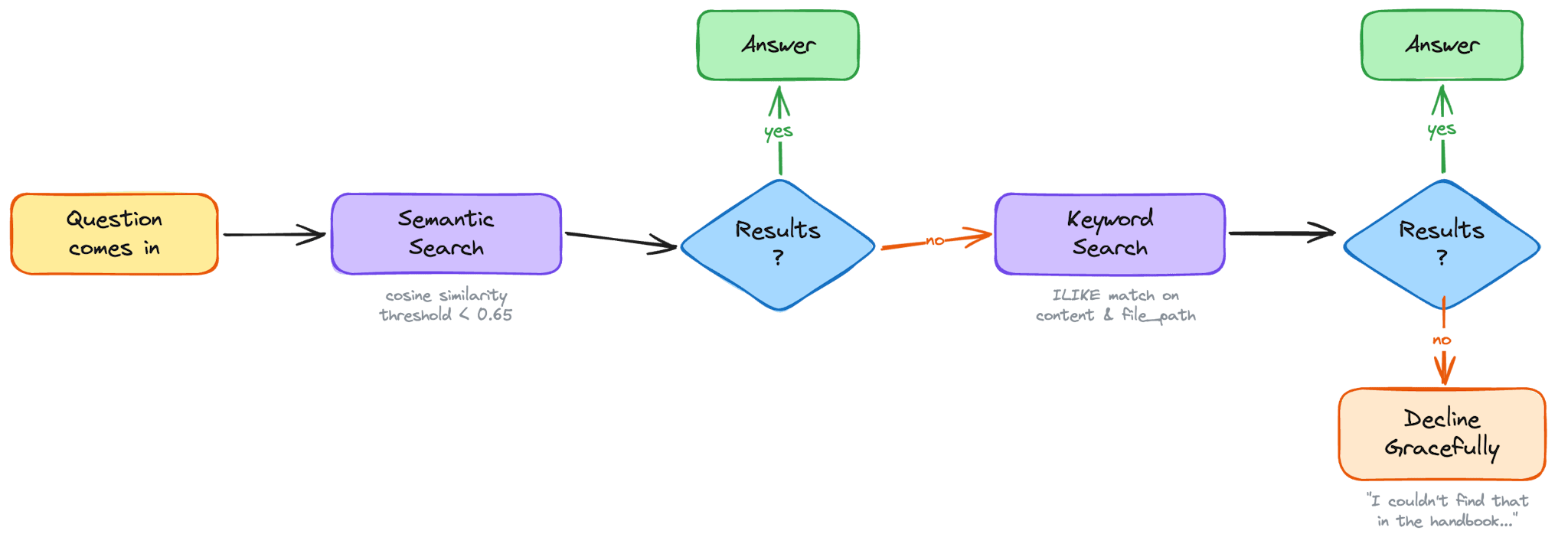
The system prompt doesn't just list these tools - it teaches the model a search strategy. If `searchDocuments` returns nothing, try `keywordSearch` with the key term. If someone mentions a specific tool or project name, always try `keywordSearch` in addition to semantic search. Use singular forms. Search for the topic before narrowing by project name. Don't give up after one empty result.
This multi-pronged approach is what makes Speedy reliable in practice. Semantic search catches the conceptual questions. Keyword search catches the named entities. The fallback logic between them means the model almost always finds something relevant - and when it genuinely can't, it says so honestly rather than guessing.
Keeping Speedy Honest
Shipping a bot is one thing. Knowing whether it's actually working is another. We have three layers of quality assurance that cover everything from logic correctness to production behaviour: structured logging, unit tests, and evals.
Structured logging
Every conversation Speedy has gets written to a `chat_logs` table in PostgreSQL. Each row captures the full picture: the `thread_id` tying it back to the Slack conversation, the user's name, the complete `messages` array (the full back-and-forth), Speedy's `response`, and a `tool_calls` JSONB column that records every tool invocation - tool name, arguments, and result. We also log `input_tokens`, `output_tokens`, and `total_tokens` so we can track cost per conversation, `duration_ms` so we know how long each response took, and the `model` ID so we can compare performance across providers.
Simple greetings get a dedicated row too, but they're flagged differently. When `isSimpleGreeting` fires, the row is written with `is_simple_request = true`, `model = 'none'`, and zero for all token counts - because no model was involved. This keeps the log complete without polluting cost or timing aggregates with sub-millisecond responses. When querying for performance analysis, filter with `WHERE is_simple_request = FALSE` to exclude these fast-path rows from duration and token statistics.
This gives us a clear trace for any response - what was asked, which tools fired, what they returned, how many tokens it cost, how long it took, and what Speedy ultimately said. When a response feels off, we can trace backwards through the logs and see exactly where the reasoning went sideways.
Unit tests
The unit tests cover the deterministic parts of the codebase - the logic that has clear, verifiable outputs without needing an LLM in the loop. `toSlackMarkdown` is the clearest example: given a string of standard Markdown, it should always produce the same Slack-formatted output. We test every conversion - headers to bold, `**bold**` to `*bold*`, `[links](url)` to Slack's `<url|text>` format, `~~strikethrough~~` to `~strikethrough~` - along with edge cases like empty strings and plain text. Similarly, the rule-checking logic that runs inside evals is pure and testable: given a response and a list of tools called, does it correctly evaluate which assertions pass and which fail?
We use Vitest for this. It handles TypeScript and ESM natively without a build step, and `npm test` runs the full suite in under 200ms - fast enough to gate every commit without adding friction.
Unit tests and evals are complementary, not interchangeable. Unit tests catch regressions in code. Evals catch regressions in behaviour. A broken formatter will surface in unit tests immediately. A degraded system prompt won't - that's what evals are for.
Evals
Logs tell you what happened. Evals tell you whether it was good. Our eval pipeline runs in three stages.
Pulling cases from production. `npm run eval:pull` queries `chat_logs` and converts recent conversations into eval case files. Each case captures the original message thread, the tools Speedy called, and metadata like the model used and timestamp. The output is a JSON file we curate by hand - adding a description of what the case is testing, `shouldContain` and `shouldNotContain` assertions, and a category tag. Grounding the eval set in real conversations means we're testing against questions the team actually asks, not synthetic examples that might miss how people naturally phrase things.
Running rule-based checks. `npm run eval:run` loads the curated cases and replays each conversation through Speedy's full pipeline - same system prompt, same tools, same multi-step reasoning loop. The first layer of checks is deterministic: did the expected tools fire? Does the response contain the strings it should? Does it avoid the strings it shouldn't? These pass/fail results are fast and unambiguous - useful for catching regressions in tool routing and specific content requirements without spending tokens on a judge.
LLM-as-judge scoring. The second layer hands the response to a judge model. For each case, a separate model call receives the original user messages, the list of tools Speedy called, and the final response - alongside a detailed scoring prompt. The judge scores the response on up to five criteria, each from 1 (poor) to 5 (excellent):
- Groundedness - is the response backed by what the tools returned, or does it contain fabricated details and hallucinated links?
- Tool usage - did Speedy search before answering, and did it use the right tools for the question?
- Persona - does the response sound like Speedy - conversational, Slack-native, using the person's name - or does it slip into robotic AI-speak
- Relevance - does it actually answer the question asked, or does it wander?
- Graceful decline - for off-topic questions only: does Speedy decline warmly and stay in character, or does it either attempt an answer it shouldn't or refuse too bluntly?
The judge returns a JSON object with a score and brief reason for each criterion. A case passes if all rule checks pass and the average judge score is 3 or above. The console shows a per-case breakdown - which checks passed, each score alongside the judge's reasoning - followed by a summary with overall pass rate, total token usage, and average score per criterion across the full suite.
The runner supports flags for targeting a specific case file (`--cases`), overriding the model under test (`--model`), skipping the judge for faster iteration (`--no-judge`), and writing full results to a JSON file (`--output`). Together, these give us a scalable way to catch quality regressions as we iterate on the prompt, swap models, or add new tools.
What's Next?
Speedy already handles the "where's that doc?" and "who's off next week?" questions well. But the architecture is designed to grow - every new tool we add becomes available to the model without changing any of the core pipeline. Here's what's on the horizon.
Richer integrations
Productive.io already powers the holiday tool, but the API has much more surface area - project timelines, task assignments, budgets, logged time. The same pattern applies to other tools the team uses day-to-day. Each integration follows the same shape: an authenticated API call, some light data transformation, and a Zod-typed tool definition. The model figures out the rest.
Conversation memory
Speedy currently draws context from the active Slack thread or DM history. It has no memory across conversations. Adding a lightweight memory layer - even something as simple as per-user preferences or a summary of recent interactions - would let Speedy build on previous conversations instead of starting from scratch every time.
Wrapping Up
Speedy started as a simple idea: stop making people dig through docs for answers they should be able to just ask for. What we built is a pipeline that takes a GitHub repo full of Markdown, turns it into a searchable vector database, and wires it up to a Slack bot that talks like a colleague - not a search engine.
None of the individual pieces are revolutionary. Webhooks, embeddings, cosine similarity, tool-calling LLMs - these are all well-trodden patterns. What makes Speedy work is how they fit together: a sync pipeline that's incremental and hands-off, a search strategy that falls back gracefully between semantic and keyword approaches, a persona that's strict about grounding but warm in delivery, and a provider-agnostic architecture that lets us swap models without rewiring the system.
The real measure isn't the technology, though. It's whether people use it. And they do - because Speedy meets them where they already are, gives them a straight answer, and gets out of the way. That's the whole point. Not a smarter bot, just a faster path to the answer that was already written down.
Conclusion
Agentic AI is a complex, multi-faceted space - and the right team makes the difference between an impressive demo and a system your business can actually rely on. That's the work we do at Digital Speed. We combine deep technical expertise with agile delivery to ship production-ready AI fast, without cutting corners on quality. Whether you need Agentic AI Solutions like Speedy, broader Artificial Intelligence strategy, or the Quality Engineering and Assurance that keeps agents honest in production, we can help. Tackling a Developer Experience challenge or scoping your first agentic build? Speak to us. We'll be straight about whether we're the right team for the job - and if we're not, we'll point you toward someone who is.