
Building Speedy - Part 1: The Knowledge Base
What We're Trying to Build & Why
Meet Speedy - a teammate that never sleeps, never forgets where the docs are, and always replies like a colleague who actually wants to help. Speedy is an AI-powered Slack bot that sits right inside our team's DMs and channels, ready to answer the questions we all have but nobody wants to chase down: "I just joined - how does onboarding work?", "Who's off next week?", or "Where's that deployment guide again?" These are exactly the kind of things that eat into everyone's day. Not because they're hard, but because finding the answer means digging through docs, pinging someone, and waiting. Speedy cuts that overhead by searching our Company-as-Code handbook and pulling live data from tools like Productive.io to surface answers in seconds - so the rest of the team can get back to the work that actually needs them.
The Stack
Before diving into how it all works, here's the shortlist of what Speedy is built on:
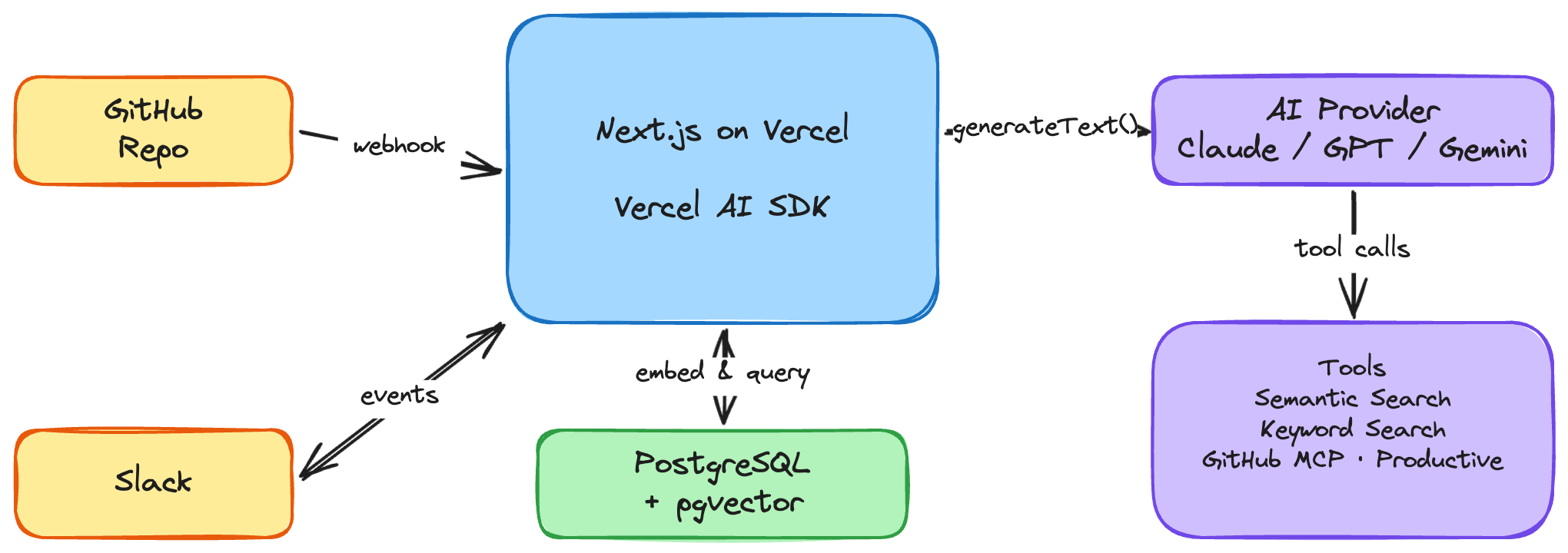
- Next.js on Vercel - the app framework and hosting. A single serverless API route handles Slack events, another handles GitHub webhooks. Vercel's `waitUntil()` lets us acknowledge Slack instantly and do the real work in the background.
- Vercel AI SDK - the glue between Speedy and the language models. It handles tool definitions, multi-step reasoning loops, and - critically - provider abstraction. We can swap between Anthropic's Claude, Google's Gemini, and OpenAI's GPT with a single environment variable. No business logic changes, no refactoring.
- PostgreSQL + pgvector - the knowledge base. Handbook content is chunked, embedded, and stored as 1,536-dimensional vectors. pgvector's HNSW index makes cosine similarity searches fast enough to feel instant.
- Slack API - how Speedy listens and responds. Event subscriptions, message posting, thread management, user profile lookups - all through Slack's Web API and Events API.
- External APIs and MCP - Speedy reaches beyond the handbook through direct API calls (Productive.io for holidays and availability) and the Model Context Protocol for GitHub. MCP lets us connect to GitHub's tool server over HTTP and expose pull requests, issues, and repo data as callable tools - no bespoke API wrapper needed.
Each of these gets unpacked in the sections that follow.
The Knowledge Base
Everything Speedy knows comes from one place: our Company-as-Code repo on GitHub. It's the team's single-source-of-truth handbook - onboarding guides, project playbooks, design processes, tooling docs - all written in Markdown and managed through PRs, just like code. Anyone on the team can contribute, and every change is tracked in git history.
But a GitHub repo on its own isn't much use to a Slack bot that needs to answer questions fast. Speedy needs to understand what's *in* those docs, not just where they live. So we spin up a PostgreSQL database with the pgvector extension to give Speedy a searchable, semantically-aware mirror of the handbook. The schema is straightforward - a single `documents` table with the columns that matter: `file_path` (which Markdown file it came from), `sha` (the file's hash, so we know when something's changed), `chunk_index` (because we break each doc into focused ~1,000-character chunks), `content` (the raw text), `embedding` (the vector representation for semantic search), and `created_at` (when it was indexed).
Syncing the Repo
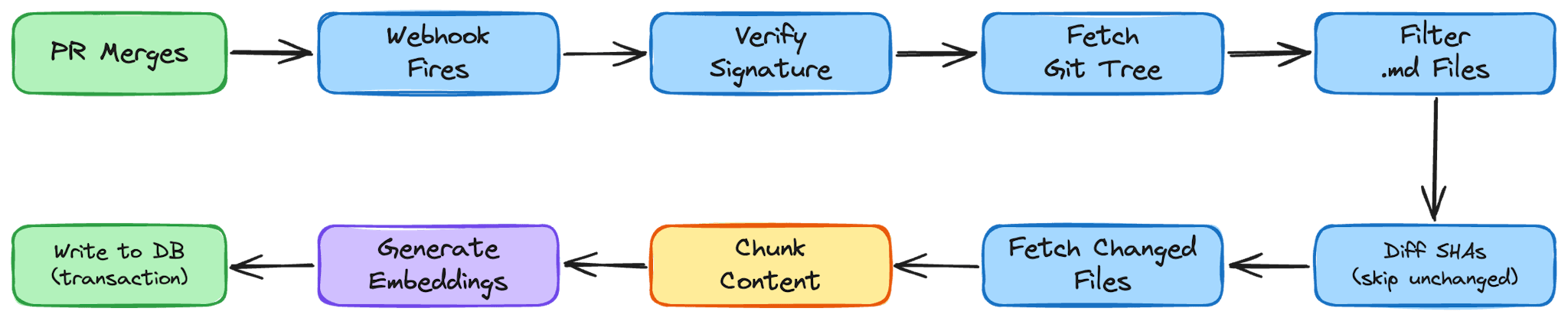
A handbook sittingx in GitHub is only useful if Speedy's database stays in sync with it. Every time a pull request merges to `main`, GitHub fires a webhook at Speedy's server. That single HTTP request kicks off the entire ingestion pipeline - no cron jobs, no manual triggers, just a tight feedback loop between the repo and the bot.
Verifying the webhook
The first thing the pipeline does is make sure the request actually came from GitHub. We generate a shared secret with `openssl rand -base64 32`, store it as a GitHub Actions secret (`WEBHOOK_SECRET`), and configure the same value on Speedy's server. When a webhook arrives, we compute an HMAC-SHA256 digest of the request body using that secret and compare it against the `x-hub-signature-256` header GitHub sends. The comparison uses `crypto.timingSafeEqual` to prevent timing attacks - a small detail, but exactly the kind of thing you don't want to get wrong in a publicly reachable endpoint. Importantly, the webhook payload itself is just a signal. We don't parse file contents out of it - we don't want large payloads hitting this endpoint and we don't need them. The webhook's only job is to say: "something changed, go look."
Fetching the git tree
Once the signature checks out, we call the GitHub Trees API to get the full recursive tree of the `main` branch. This gives us every file in the repo in one call - path, SHA hash, type, and a URL to fetch its raw content. We filter this tree down to just the Markdown files living under `docs/`, which is the slice of the repo that represents the handbook.
Pruning stale files
Before we process anything new, we clean house. We compare the file paths in the tree against what's already in our `documents` table and delete any rows whose `file_path` no longer exists in the repo. If someone removes or renames a doc in a PR, it disappears from Speedy's knowledge base as soon as that PR merges. No stale answers, no ghost documents.
Syncing each file
Now we walk through every Markdown file in the tree. For each one, we check whether its SHA already exists in the database. Git's content-addressable hashing does the heavy lifting here - if the SHA matches, the file hasn't changed and we skip it entirely. On a typical sync where someone edited one or two docs, this means we're only doing real work on those files. Everything else is a no-op. For files that are new or changed, we fetch the raw content from GitHub using the file's blob URL and a `GITHUB_TOKEN` for authentication.
Chunking the content
Raw Markdown files can be long - and you can't just throw an entire document at an embedding model and expect good retrieval later. So we break each file into focused chunks using a recursive splitting strategy.
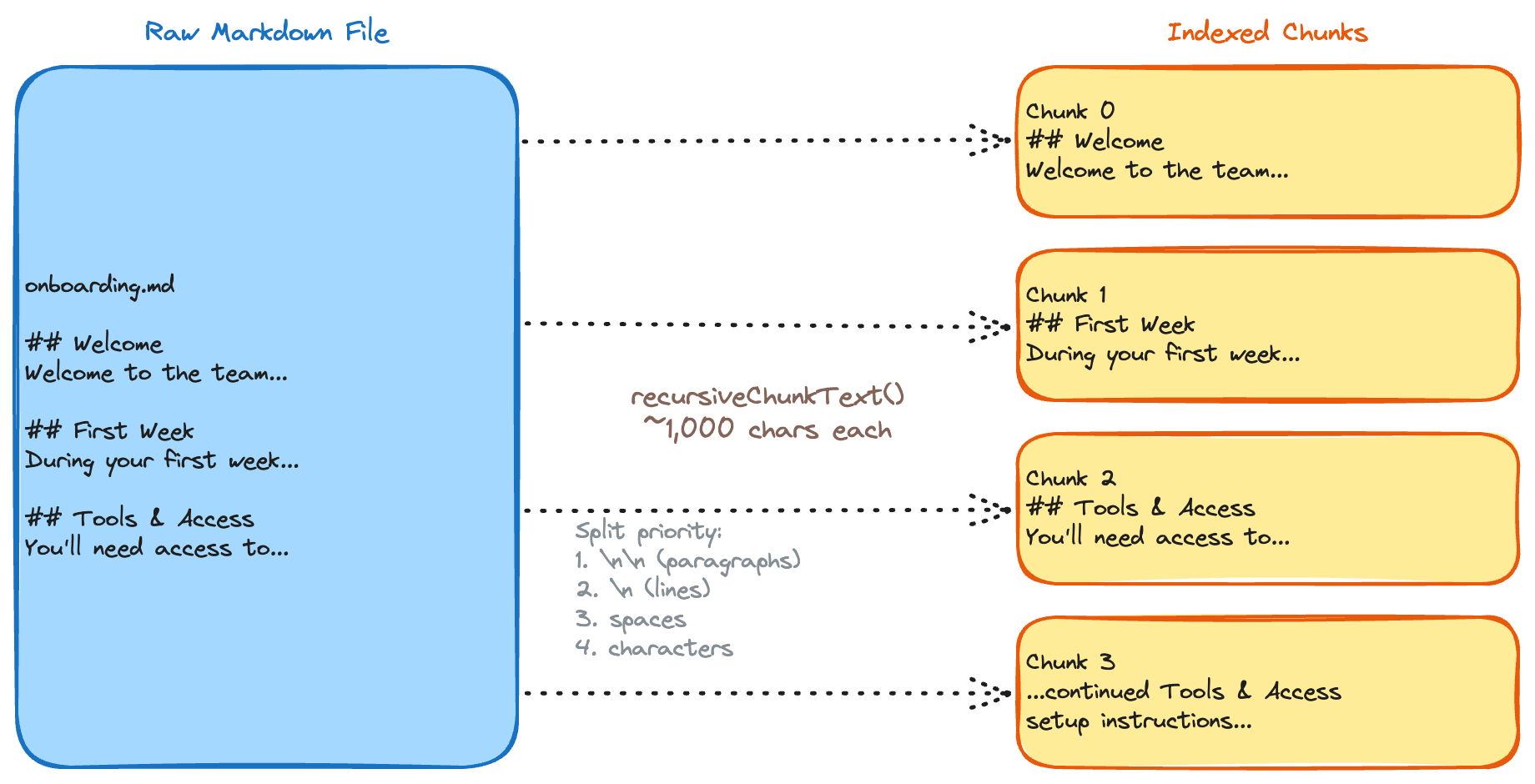
Our `recursiveChunkText` function tries a series of separators in order of preference: double newlines first (paragraph breaks), then single newlines, then spaces, and finally character-by-character as a last resort. The target is ~1,000 characters per chunk. This approach respects the natural structure of Markdown. Paragraphs and sections stay together when possible, which means each chunk tends to carry a single coherent idea - exactly what you want for an embedding that'll be matched against a user's question later. We deliberately chose no overlap between chunks to keep the pipeline simple and the index lean. Context can get split at boundaries, but we mitigate this at query time by fetching adjacent chunks around each match. If retrieval at chunk edges becomes a problem in practice, adding 10–20% overlap or splitting on Markdown headings (`##`) first are straightforward upgrades - but so far the neighbour-fetch approach has been good enough.
Generating embeddings
Each chunk gets passed through OpenAI's `text-embedding-3-small` model, which converts it into a 1,536-dimensional vector - essentially a list of 1,536 numbers that together represent the meaning of that text.
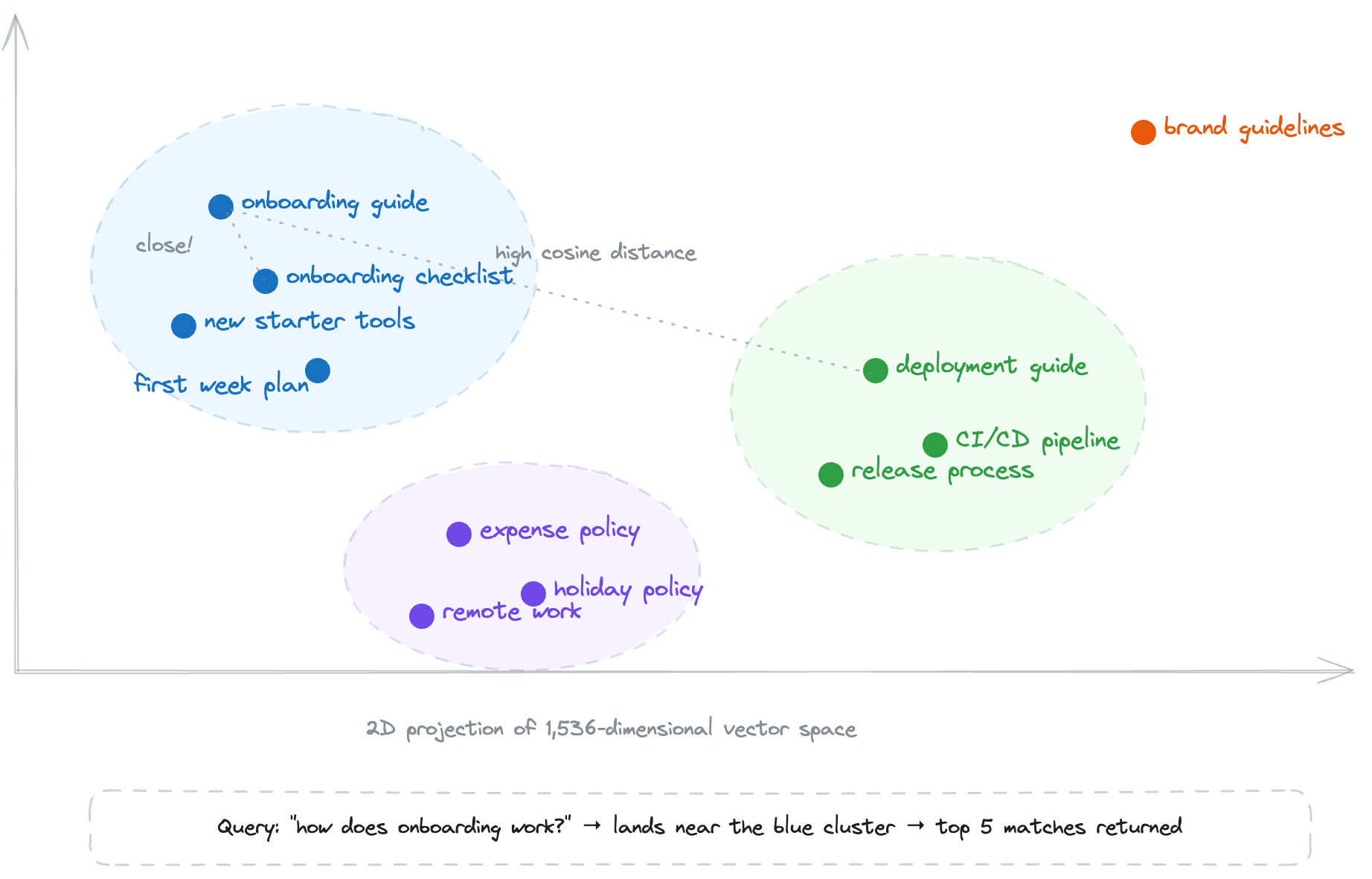
The dimensionality is a design choice by OpenAI to balance resolution and efficiency: more dimensions capture subtler nuances in language, but larger vectors cost more memory and are slower to compare, so 1,536 is the sweet spot for this model. We batch these using `embedMany` from the Vercel AI SDK so we're not making a separate API call per chunk.
The key insight is that computers can't "read," but they're great at math. By representing text as a point in this 1,536-dimensional space, we can perform vector search: if two chunks are about similar topics, their coordinates will be close together. The distance between two vectors tells the system how related the ideas are - capturing not just keywords, but concepts, relationships, and intent.
Writing to the database
The final step is transactional. For each file, we open a `BEGIN` block, delete any existing chunks for that file path, insert the new chunks with their embeddings, and `COMMIT`. If anything goes wrong mid-file - a malformed embedding, a database hiccup - the whole transaction rolls back and nothing is left in a half-written state. Each row in the `documents` table carries the `file_path`, `sha`, `chunk_index`, `content`, and `embedding` as a `vector(1536)` column backed by pgvector's HNSW index.
The result: within seconds of a PR merging, Speedy's knowledge base is up to date. Changed docs are re-chunked and re-embedded, deleted docs are pruned, and unchanged docs are untouched. It's incremental, atomic, and - once the webhook secret is in place - completely hands-off.